
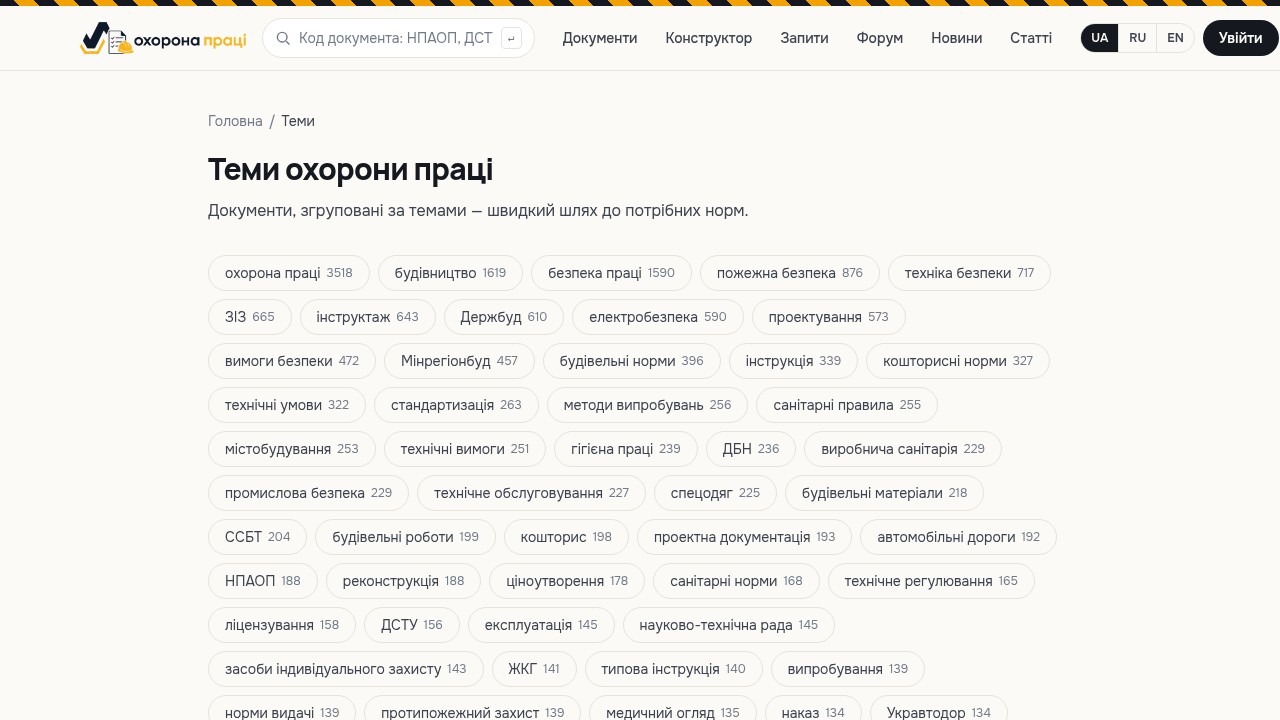
When you need to quickly gather every regulation on a single topic — say, medical examinations or PPE — the routine begins: searching by code, checking the status, filtering out outdated revisions, compiling a list. This takes hours, and the risk of missing something always remains. The Occupational Safety Topics section solves exactly this pain: it groups documents into ready-made thematic collections, so you open the topic you need and immediately get an up-to-date set of NPAOP, DSTU, DBN and NAPB documents.
What it is
Topics are structured document collections organized by occupational safety areas: training, medical examinations, personal protective equipment, fire safety, electrical safety and more. Each topic is a selection drawn from a registry of over 45,977 regulatory documents. Instead of searching for each act separately, you see a complete cross-section of the topic: which documents govern it, what their status is and how they relate to one another. This is especially useful when a topic spans documents of different classes and types — NPAOP, state standards, building codes, fire safety rules — all relevant at once. The topic gathers them in one place, so you no longer have to keep dozens of codes and sources in your head.
Why it helps an occupational safety engineer
The section saves your most valuable resource — the time spent searching and verifying. Instead of dozens of separate queries, you work with a ready-made list that is already filtered by content.
- Fast onboarding into a new topic — in minutes you see the entire document base for the area.
- Lower risk of missing a key act when preparing orders, regulations or training programs.
- A convenient entry point: from a topic you move to a document card with a plain-language explanation, status, dates and full text.
- A reference for new occupational safety staff who are just learning the area.
How to use it
Open the Topics section and choose the area you are interested in. Inside the topic you will see a list of related documents. Click any of them and you land on its card, which includes a brief explanation of the essence, the status and validity dates, the full text and a download option. Save the documents you find useful to your personal account so you don't have to search for them again. If a card lists related documents, review those too — often that is exactly where you find an extra standard or rule that complements the main topic. This way you gradually build a complete picture of the area without ever leaving a single convenient workspace.
Example: preparing for an electrical safety inspection
Imagine your enterprise is about to undergo an electrical safety inspection. Instead of trying to recall individual codes from PUE, NPAOP and DSTU, you open the relevant topic and immediately see a list of the area's active documents. You check statuses, open the cards of the acts you need, compare your local documents against the requirements — and build an inspection checklist in mere minutes rather than half a day spread across several sources.
Tips
- Start work on any area from a topic — it is faster than pinpoint searching.
- Watch the document status: a topic shows both active and superseded acts, so verify the dates.
- Combine topics with other sections: found a document — move to its related ones and save what you need to your account.
- Use a topic as the basis for developing your own instructions from model ones in line with NPAOP 0.00-4.15-98.
Stop collecting regulations by hand, one document at a time. Open the Occupational Safety Topics section, choose your area and get a ready, up-to-date set of documents for your daily work — free of charge.